Reversal Modes
RD Renko (paid) offers three display modes that control how reversal bars are rendered. All three modes use the same underlying brick and reversal logic — the difference is purely visual.
Set the mode via the Value2 parameter in NinjaTrader's Data Series window.
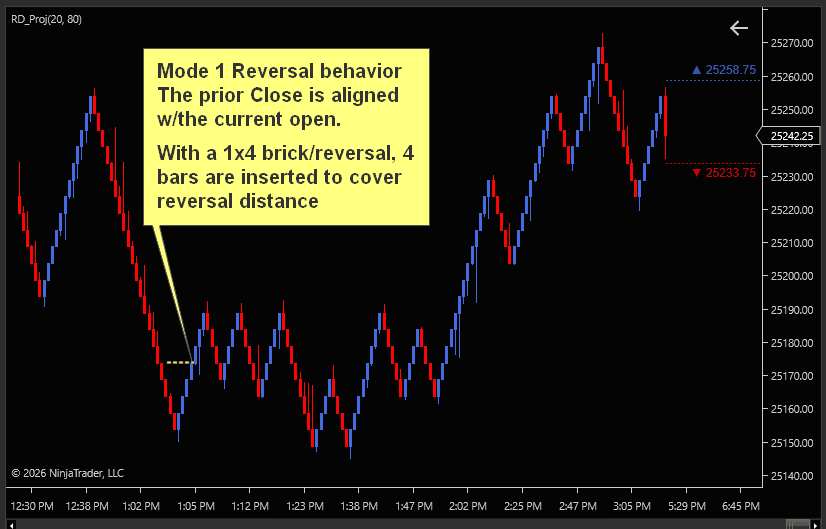
Mode 1 — CO-Uni (Close-Open Uniform)
Value2 = 1
When a reversal occurs, the chart draws N uniform bricks from the previous bar's close to the reversal level. Each brick is exactly 1x brick size.
Characteristics:
- Reversal appears as multiple same-sized bricks
- Previous bar's close = first reversal bar's open
- Preserves uniform brick sizing across the entire chart
- Best for: traders who want consistent brick dimensions everywhere
How it works: If the brick size is 2 ticks and a 6-tick reversal occurs, you get 3 uniform 2-tick bricks from the close of the previous bar in the reversal direction.
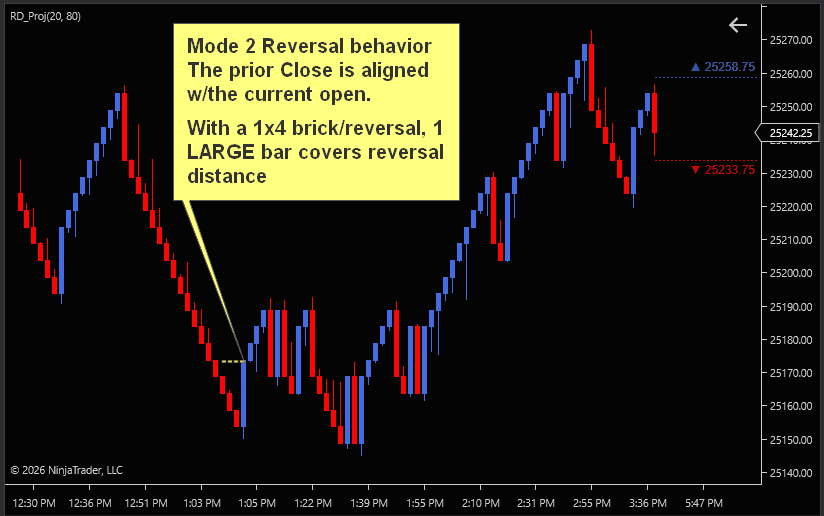
Mode 2 — CO-Dbl (Close-Open Double)
Value2 = 2
When a reversal occurs, the chart draws one tall bar that spans the entire reversal range from the previous bar's close.
Characteristics:
- Reversal appears as a single bar taller than normal bricks
- Previous bar's close = reversal bar's open
- Visually distinct — reversals are immediately obvious
- Best for: traders who want reversals to stand out clearly on the chart
How it works: If a 6-tick reversal occurs, one bar is drawn from the previous close spanning all 6 ticks. The bar is visually taller than the standard bricks.
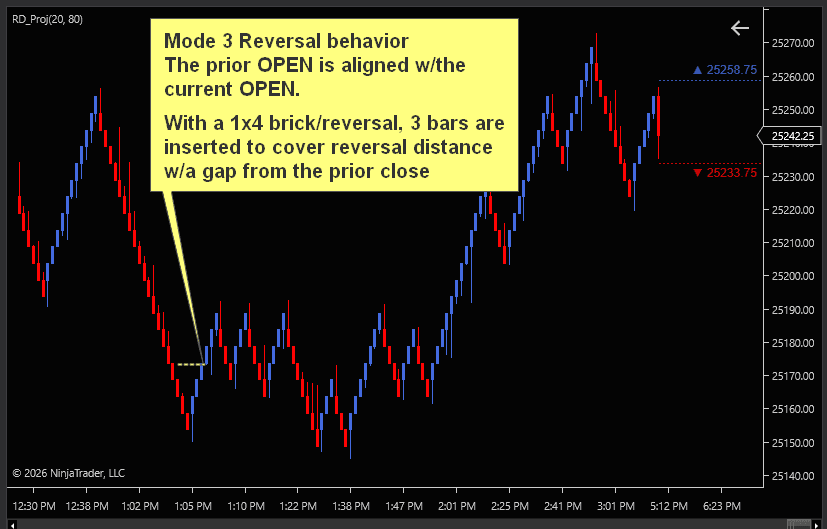
Mode 3 — OO-Uni (Open-Open Uniform) (Default)
Value2 = 3
Standard renko with gap-fill bricks. When a reversal occurs, the chart fills the gap between the previous bar's open and the new direction with uniform bricks.
Characteristics:
- Minimum reversal is 2x brick size (to fill the gap from the previous bar's open)
- Gap between previous open and reversal start is filled with bricks
- Most familiar layout for traders coming from stock renko
- Best for: traders who prefer the traditional renko look with proper gap handling
How it works: The reversal is measured from the previous bar's open (not close). The gap between the previous bar's open and the reversal level is filled with uniform bricks, each 1x brick size.
Note: In OO-Uni mode, the minimum effective reversal is always at least 2x brick size, since a 1x reversal would not create enough room for a gap-fill brick. If you set a reversal smaller than 2x, it will be treated as 2x.
Which mode should I use?
All three modes produce the same trade signals for the same brick/reversal parameters — only the visual representation differs. Choose based on how you prefer to read your charts.
Mode 3 (OO-Uni) may be more familiar to renko users, while Mode 2 (CO-Dbl) is more representative of real price movement & best for backtesting/strategies.